


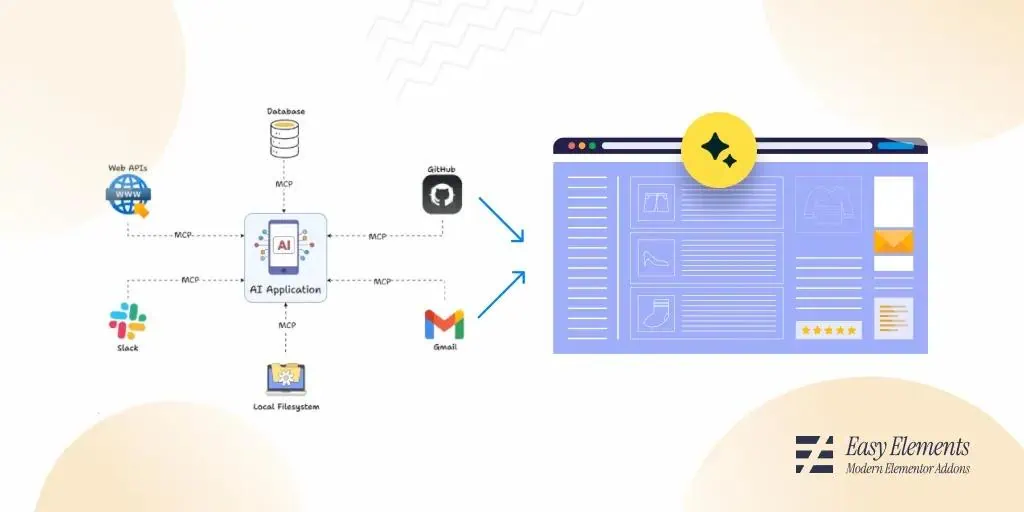
What if your AI could finally connect to everything you use to build the web?
AI tools have become smarter, but not more connected. They can write code and generate content, yet they still rely on brittle APIs and one off integrations that create friction and slow creators down.
The Model Context Protocol, or MCP, changes that.
MCP is an emerging standard that gives AI models a universal way to access tools, data, and live systems without custom integrations. For web creators, this means AI assistants that can work across your entire stack. They can read files, query content, update designs, and take real action inside your tools.
In this article, we will explain what MCP is and why web creators who understand it early will have a major advantage as AI powered workflows become the norm.
What Is an MCP??
The Model Context Protocol (MCP) is an open, standardized protocol that lets AI models (like large language models) securely and consistently access external tools, data sources, and services.
Think of MCP as “USB-C for AI integrations”: instead of every app building a custom connector for every model, MCP defines a common way for models and tools to talk to each other.
How MCP Actually Works
MCP (Model Context Protocol) is a standard way for an AI model (like ChatGPT) to discover, understand, and use external tools, data, and services in a consistent, secure way.
Think of it as “USB-C for AI tools”: one protocol that lets models plug into many different capabilities without custom wiring each time.
The Core Problem MCP Solves
Before MCP:
- Every app integrated tools differently
- Models needed custom prompts or glue code per tool
- Tool usage was fragile, undocumented, and hard to secure
With MCP:
- Tools describe themselves
- Models can reason about and call tools dynamically
- Clients control permissions and execution
The Big Picture Architecture
┌──────────┐        MCP        ┌─────────────┐
│  Model   │ ◀──────────────▶ │ MCP Client  │
└──────────┘                  └─────────────┘
                                      │
                                      ▼
                              ┌─────────────┐
                              │ MCP Servers │
                              │ (Tools)     │
                              └─────────────┘
Roles
- Model: Decides what to do
- MCP Client: Orchestrates calls, enforces permissions
- MCP Server: Exposes tools, resources, and prompts
What an MCP Server Provides
An MCP server can expose three things:
1. Tools
Callable functions with:
- Name
- Description
- JSON schema for inputs/outputs
Example:
{
  "name": "search_files",
  "description": "Search files by keyword",
  "inputSchema": {
    "type": "object",
    "properties": {
      "query": { "type": "string" }
    }
  }
}
2. Resources
Structured data the model can read:
- Files
- Database rows
- API-backed content
- Streams
Think: read-only context with an addressable URI
3. Prompts
Reusable prompt templates:
- System instructions
- Task scaffolding
- Domain-specific guidance
Step-by-Step: How MCP Actually Works
1. Server Starts
An MCP server runs locally or remotely and declares:
- What tools it has
- What resources exist
- What prompts it offers
2. Client Connects
The MCP client:
- Discovers the server
- Reads its capabilities
- Decides what the model is allowed to use
3. Model Sees Capabilities
The model is shown:
- Tool names + schemas
- Resource descriptions
- Prompt options
Importantly:
The model does not execute tools directly
4. Model Requests an Action
The model outputs something like:
{
  "tool": "search_files",
  "arguments": {
    "query": "MCP spec"
  }
}
This is just a request, not execution.
5. Client Executes Safely
The MCP client:
- Validates arguments against schema
- Checks permissions
- Calls the MCP server
- Gets structured results
6. Results Go Back to the Model
The model receives:
{
  "results": [
    { "file": "spec.md", "match": "Model Context Protocol" }
  ]
}
Now the model can reason, summarize, or take next steps.
Why MCP Is Different from “Tool Calling”
| Old Tool Calling | MCP |
|---|---|
| Hardcoded | Discoverable |
| Prompt-based | Schema-based |
| Model executes | Client executes |
| Fragile | Safe & validated |
| App-specific | Universal |
A Concrete Mental Model
MCP is like a menu + waiter system
- Servers = kitchens
- Tools = menu items
- Model = customer
- Client = waiter (checks rules, places orders, delivers results)
The customer never enters the kitchen.
Why MCP Is a Breakthrough for Web Creators
Model Context Protocol, or MCP, is a breakthrough for web creators because it standardizes how AI models connect to real tools, data, and workflows. It removes the need for fragile custom integrations and allows AI to operate as a real part of a web product.
1. From chatbot to teammate
Before MCP, most AI features were limited to text input and text output. They were isolated from real systems like databases, CMS platforms, and internal tools. Integrations were brittle and often unsafe.
MCP changes this by defining a clear and open protocol that allows models to discover tools, call them safely, and understand structured data. This lets AI participate directly in your product instead of just responding to prompts.
2. One integration that works everywhere
Without MCP, creators had to build separate integrations for each model and platform. Every change introduced breakage and lock in.
With MCP, tools are exposed once through an MCP server. Any compatible model can use them. This makes applications model agnostic and future proof, which is critical for fast moving web creators.
3. Real capabilities for real apps
MCP enables AI to work with live systems in a reliable way. This includes querying databases, editing CMS content, triggering backend actions, and following domain specific rules.
Creators stay in control by defining what tools exist and how they behave. The model learns how to use those tools without being given raw access or credentials.
4. Safety built into the design
MCP enforces explicit tool definitions, structured inputs and outputs, and clear permission boundaries. This reduces common risks like prompt injection, accidental data exposure, and unpredictable behavior in production.
For web creators, this means AI features can be shipped with confidence.
5. More leverage for smaller teams
By removing boilerplate and encouraging clean separation between models and execution, MCP lets small teams build powerful AI driven features that once required large infrastructure efforts.
This includes intelligent dashboards, smart admin tools, autonomous workflows, and personalized user experiences.
6. A foundation for the AI native web
MCP is not just another tool. It represents an architectural shift. It enables AI first products, composable systems, and tool driven reasoning instead of prompt hacks.
Just as APIs standardized the modern web, MCP is standardizing how AI integrates with it.
The Future of AI Native Web Workflows
The future of the web is not just AI assisted. It is AI native. In an AI native workflow, artificial intelligence is not an add on feature but a core participant in how software is built, operated, and evolved.
i. AI as an active participant
Traditional web workflows treat AI like a helper that responds to prompts. In AI native workflows, AI systems actively plan, execute, and adapt tasks using real tools and real data. They read from databases, trigger backend actions, and follow business rules just like any other system component.
This shift turns AI from a conversational layer into an operational layer.
ii. Tool driven instead of prompt driven
The future moves away from long fragile prompts and toward structured tools. AI systems will reason about which tool to use, when to use it, and how to interpret the results. This makes workflows more reliable, testable, and easier to evolve over time.
Creators define the tools and constraints. Models learn how to operate within them.
iii. Model flexibility and long term stability
AI native workflows will be model agnostic. As better models appear, systems can upgrade without rewriting application logic. This protects creators from lock in and keeps products competitive as the AI ecosystem evolves.
Protocols like MCP make this possible by separating models from execution.
iv. Safer automation by design
As AI gains more control, safety becomes foundational. Future workflows will enforce permissions, structured inputs and outputs, and clear boundaries between reasoning and execution.
This allows creators to automate high impact tasks without risking unpredictable behavior or data exposure.
v. Smaller teams with greater leverage
AI native workflows dramatically reduce the effort needed to build and maintain complex systems. Small teams can ship features that previously required dedicated ops, data, or automation teams.
This shifts the competitive advantage from company size to clarity of product vision.
vi. A new way to build the web
The AI native web will be composed of systems where humans design goals and constraints, tools define capabilities, and AI handles execution and adaptation.
Web workflows will become more autonomous, more resilient, and more creative.
vii. Closing thought
The future of web workflows is not about replacing developers. It is about giving them intelligent systems that work alongside them as reliable collaborators.
AI native workflows are not coming. They are already being built.
Final Thoughts
MCP is more than a technical protocol. It transforms how web creators build, integrate, and scale AI within their products. By providing a standard way for models to safely access tools, structured data, and workflows, MCP turns AI from a passive assistant into an active collaborator.
This reduces integration complexity, improves safety, and future-proofs applications against model changes. For creators looking to build AI native experiences, MCP is not just an option rather it is the foundation for the next generation of intelligent, adaptive web products.