Elementor is one of the most popular page builders for WordPress, but many websites built with Elementor suffer from performance issues caused by unused CSS. When unnecessary styles load on your pages, they increase file size and slow down page speed.
In this guide, you will learn how to remove unused CSS from Elementor pages and optimize your website for better performance and faster loading times.
Why Elementor Pages Load Unused CSS
By default, Elementor loads many CSS files to support all widgets and design features. Even if you use only a few widgets, additional styles may still be loaded on the page.
This happens because Elementor needs to ensure that all widgets work correctly across different layouts.
Common causes of unused CSS include:
• Widgets that are not used on a page
• Multiple Elementor addons installed
• Global style files loaded across all pages
• Third-party plugin styles
When too many styles load, your page becomes heavier and affects Google PageSpeed scores.
Why Removing Unused CSS Matters
Optimizing CSS improves your website performance in several ways:
Faster page load times
Better Core Web Vitals score
Improved SEO performance
Better user experience
Lower server resource usage
Google PageSpeed Insights often reports “Remove unused CSS” as a major recommendation for Elementor websites.
Method 1: Enable Elementor Improved Asset Loading
Elementor already includes built-in performance settings that help reduce unused CSS.
To enable it:
Go to WordPress Dashboard → Elementor → Settings → Performance
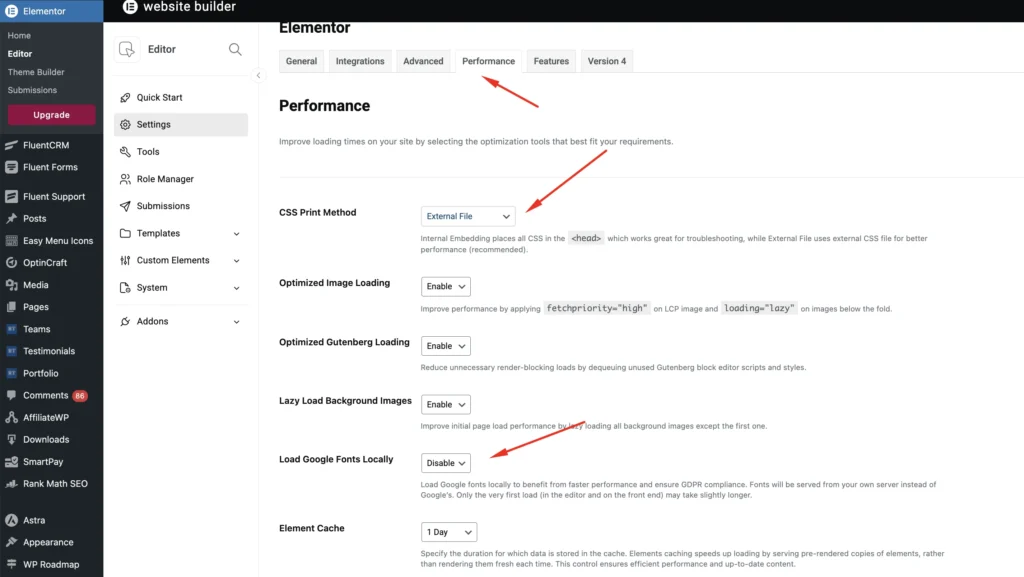
Enable the following options:
CSS Print Method – Inline Embeeding
Optimize Image Loading
Load Google Fonts Locally
After enabling these features, Elementor will load fewer CSS files and optimize the layout structure.
Method 2: Remove Unused Widgets
Many Elementor users install multiple addons that load CSS for widgets they never use.
A good practice is to disable unused widgets.
You can do this by going to your addon settings and turning off widgets you don’t need.
For example, if you are using Easy Elements, you can disable unused widgets directly from the Easy Elements dashboard, ensuring that only required styles load on your pages.
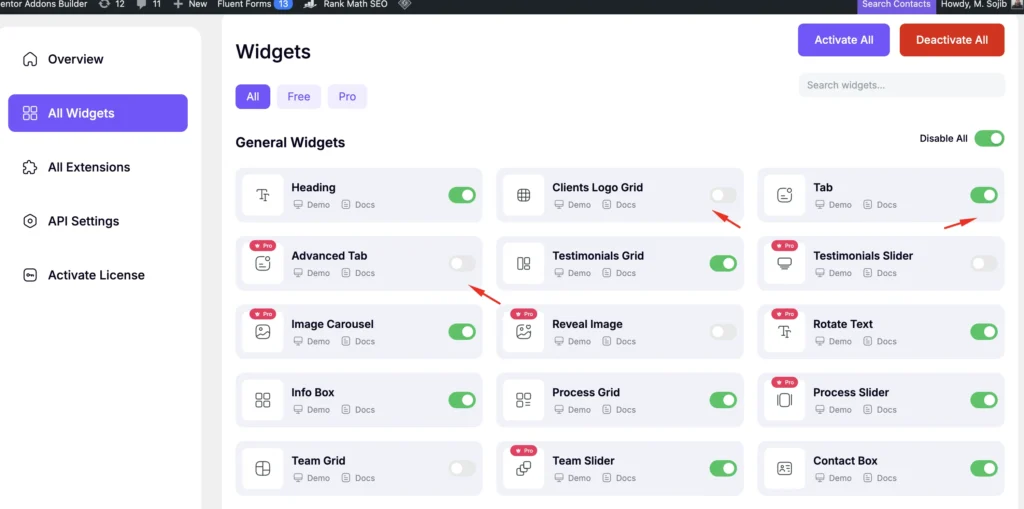
This significantly reduces unnecessary CSS.
Method 3: Use a Performance Optimization Plugin
Caching and optimization plugins can help remove unused CSS automatically.
Popular options include:
WP Rocket
LiteSpeed Cache
FlyingPress
These tools analyze your pages and generate optimized CSS that only includes styles actually used on the page. This can dramatically improve your PageSpeed scores.
Method 4: Avoid Installing Too Many Elementor Addons
One of the biggest causes of CSS bloat is installing several Elementor addon plugins at the same time. Each addon loads its own CSS files, which increases the overall size of your page. Instead, try to use a well-optimized addon that provides the widgets you need without loading unnecessary assets.
A lightweight solution like Easy Elements focuses on performance and allows users to enable only the widgets they need.
Method 5: Minify and Combine CSS
Minifying CSS removes unnecessary characters such as spaces and comments, reducing file size. Most caching plugins allow you to enable CSS minification easily.
Go to your caching plugin settings and enable:
CSS Minification
CSS Combination (if supported)
This reduces the number of requests and improves loading speed.
Best Practices for Optimizing Elementor CSS
To keep your Elementor website fast, follow these best practices:
- Use a lightweight theme
- Limit the number of Elementor addons
- Disable unused widgets
- Optimize CSS and JS files
- Regularly test your site using PageSpeed Insights
These steps help ensure your website remains fast and optimized.
Final Thoughts
Removing unused CSS from Elementor pages is one of the most effective ways to improve website speed and performance. By enabling Elementor’s performance features, disabling unused widgets, and using optimization plugins, you can significantly reduce unnecessary CSS.
With the right setup and a performance-focused workflow, Elementor websites can load quickly while still providing advanced design flexibility.