

If you’ve spent any real time building sites in Elementor, you’ve probably hit this question at some point: do I need Elementor Pro, an addon plugin, or both?
This Elementor Addons vs Elementor Pro comparison will help you understand what each option does, where they overlap, and which setup makes the most sense for your website.
The instinctive answer feels obvious — Pro gives you more than the free version, addons give you even more widgets on top of that, so more is better, right? Except that’s not really how these two things relate to each other. They’re not stacked on a “more features” ladder. They solve genuinely different problems.
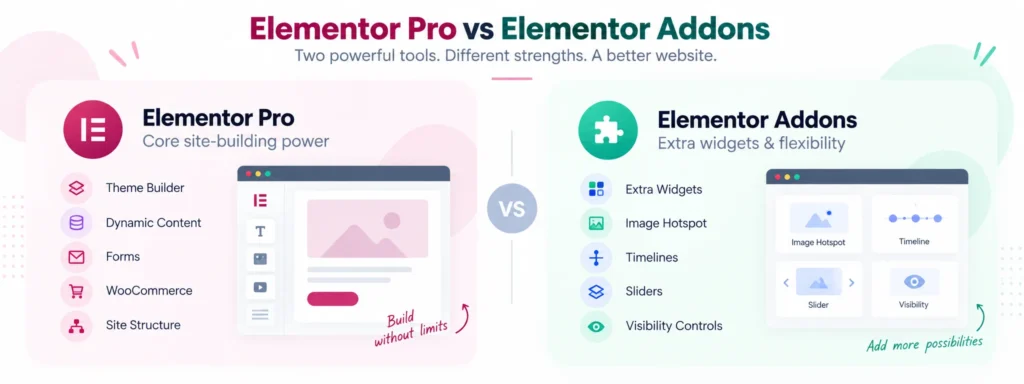
Elementor Pro extends Elementor itself — Theme Builder, dynamic content, forms, and (depending on your plan) WooCommerce and popup tools. Addons are third-party plugins built to extend Elementor from the outside, usually by adding widgets, layouts, or functionality Elementor never set out to include in the first place.
So the useful question isn’t “which one is better.” It’s “which one actually gives me what my site needs.” Let’s work through that properly.
What Elementor Pro actually gives you
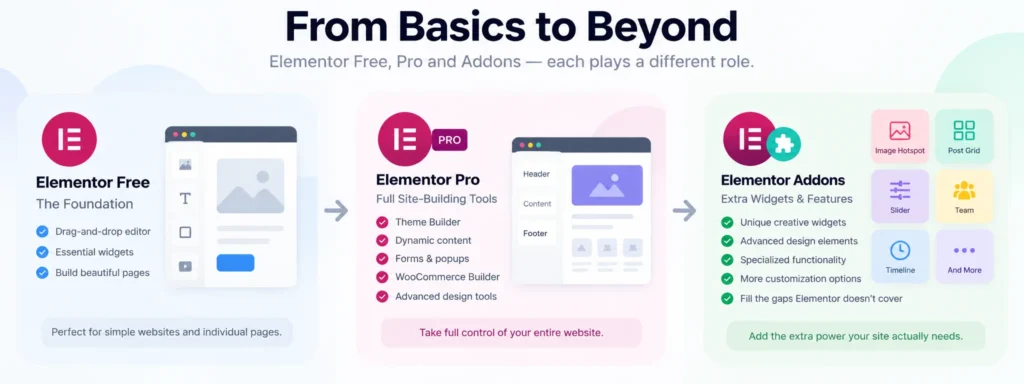
Elementor Free already covers the basics — the drag-and-drop editor and enough widgets to build normal pages. Pro builds on top of that with things like:
- Theme Builder
- Dynamic content
- More advanced widgets
- Form and popup builders
- WooCommerce Builder
- Custom CSS and code options
- Marketing integrations
- Custom post type and field integrations
Worth noting: Elementor splits some of these across different paid tiers, so it’s worth double-checking what your specific plan actually unlocks before you assume you’re covered.
The important thing here isn’t the widget count, though. It’s that Pro can change how you build a site, not just what you can drop onto a page. Theme Builder is the clearest example — instead of leaving your header and footer entirely up to your theme, you design them visually inside Elementor. That’s a structural shift, and it’s most valuable when you’re building a complete custom site rather than a handful of pages.
What Elementor addons actually give you
Elementor addons work differently. If Elementor is the platform and Pro expands its core, addons are third-party developers building on top of that platform to fill in gaps Elementor doesn’t cover — new widgets, dynamic tags, form actions, controls, whatever they decide to build.
In practice, that tends to look like things such as:
- Image galleries
- Image hotspots
- Sliders and carousels
- Pricing tables and testimonials
- Team and post grids
- Timelines
- Conditional visibility
- Mega menus
- Extra WooCommerce widgets
- Content protection
You generally don’t install an addon because Elementor is missing something fundamental. You install one because you need a specific design element or bit of functionality that Elementor either doesn’t offer, or doesn’t offer in the way you actually want.
The quick comparison
| Features | Elementor Free | Elementor Pro | Elementor Addons |
|---|---|---|---|
| Drag-and-drop building | ✓ | ✓ | Uses Elementor |
| Basic widgets | ✓ | ✓ | Usually adds more |
| Advanced design widgets | Limited | ✓ | ✓ |
| Theme Builder | — | ✓* | Some offer alternatives |
| Header/footer customization | Limited | ✓ | Available in some |
| Dynamic content | Limited | ✓* | Available in some |
| Form building | — | ✓* | Through select addons |
| Popup building | — | ✓* | Some offer alternatives |
| WooCommerce design tools | Limited | ✓* | Many addons extend this |
| Creative widgets | Limited | ✓ | Often a real strength |
| Third-party integrations | Limited | ✓ | Often available |
| Cost | Free | Paid | Free, paid, or freemium |
*Depends on your Pro plan.
When Pro is genuinely the stronger call
A few situations where reaching for Pro makes more sense than assembling addons.
You’re building the whole site in Elementor, not just pages. Header, footer, single post, archive, search results, custom post templates — if you want visual control over all of it, that’s exactly what Theme Builder is for. At that point you’re not using Elementor for individual pages anymore, you’re using it as the site’s actual architecture.
You’re working with dynamic content. Think real estate listings, job boards, directories, portfolios, event sites — anywhere you’d rather build one template and pull in data than hand-design hundreds of pages. Pro’s dynamic tools are made for exactly this, and for agencies building structured sites, that matters a lot more than another fifty visual widgets would.
You’d rather have fewer moving parts. If Pro already gives you the form, the popup, the theme templates, the WooCommerce layout, and the widgets you need, there’s not much upside in stitching together three or four separate plugins to recreate the same thing. One integrated system is usually easier to keep maintained than a pile of loosely related ones.
When an addon is genuinely the stronger call
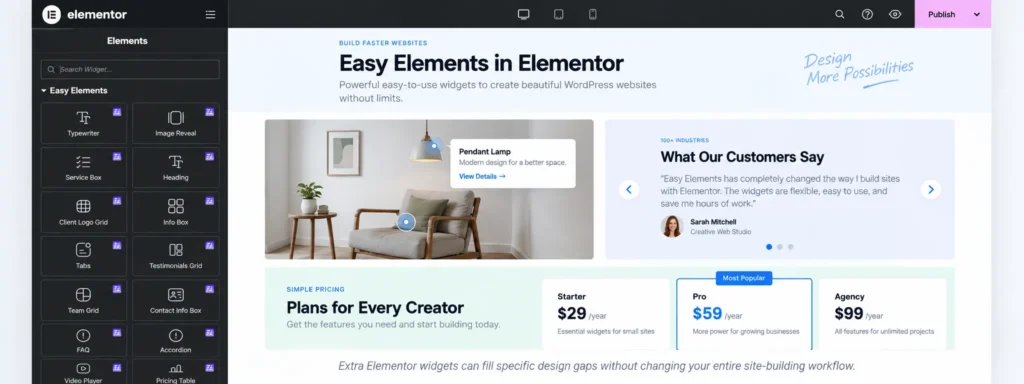
You basically just need more widgets. This is probably the most common reason people go looking for an addon in the first place — Elementor Free is doing the job fine, you just want an image hotspot, a proper pricing table, a timeline, a decent testimonial slider. Buying a full site-building suite to get a handful of design elements isn’t really proportionate. A well-built addon closes that gap without the overhead.
You need something Elementor was never going to build. Third-party developers don’t have to cover every use case — they can go deep on one narrow thing. That’s why addons tend to be strong on visibility controls, more sophisticated navigation, unusual content layouts, or interactive design elements like hotspots and flip boxes. When Elementor itself just doesn’t have an answer for what you need, an addon frequently does.
You want Free plus a couple of specific upgrades, not the whole Pro package. Say you’re building a straightforward five-page company site. Your theme already handles the header and footer well. You don’t need dynamic templates, complex forms, or popups — you just want better testimonials, a nicer pricing section, and some decent sliders. In that case, Elementor Free plus one good addon covers the job, and paying for Pro would mostly be paying for things you’ll never touch.
Do addons actually replace Pro?
Sometimes, partially — this is probably the most common misunderstanding in this whole comparison. Some addons offer header/footer builders, form widgets, popups, or WooCommerce elements that genuinely overlap with what Pro does. But stitching those together from three or four different plugins isn’t the same as replacing Pro’s integrated workflow.
It can absolutely work when it’s done deliberately. Where it goes wrong is when a site ends up leaning on Elementor’s full site-building ecosystem but every one of those pieces is coming from a different addon — at that point you’ve usually made your setup more complicated than just using Pro would have been.
Can you use both together?
Yes, and for a lot of professional Elementor users, this is actually the normal setup. A practical stack looks something like:
- Elementor — the core visual editor
- Elementor Pro — theme building, dynamic content, forms, WooCommerce, marketing tools
- An addon — the specific widgets or functionality Pro doesn’t cover
That combination gets you Pro’s structural foundation without limiting your design options to whatever ships in Pro’s widget library.
Just don’t install every addon you come across
This is where a lot of Elementor sites quietly go wrong. You find an addon for a nice slider. Then another for a timeline. Then one more for an image hotspot. Then a fourth because it happens to have one WooCommerce widget you need. Before long you’ve got six addon plugins installed, each shipping hundreds of widgets, and you’re actually using maybe eight of them combined.
Every plugin you add is another codebase somebody has to keep updated, another thing that can conflict with a WordPress or Elementor update, another surface for security issues. And it’s worth knowing that Elementor’s own support documentation is upfront that problems involving third-party plugins are generally the third-party developer’s responsibility to fix, not Elementor’s. So it pays to be a bit choosy.
Will addons slow your site down?
Not automatically, and “addons make Elementor sites slow” is more of a myth than a rule. What actually matters is how the addon is built and what it loads. A properly built one only loads its scripts and styles when the page actually needs them — Elementor’s own developer docs give widgets a way to declare exactly that.
Where performance problems tend to actually come from is installing several overlapping addons, layering on heavy animation everywhere, adding sliders and effects you don’t need, using oversized images, or relying on plugins that just weren’t built carefully. So don’t judge an addon purely by how many widgets it ships with — look at how it’s built, how often it’s maintained, and whether you can turn off the parts you’re not using.
A quick way to decide
Go with Free + an addon if you’re mostly building standard pages, your theme already handles the header/footer/archives fine, and you’re only missing a handful of specific design widgets. A restaurant site with home, about, menu, gallery, and contact pages, where the theme’s already doing its job and you just want nicer sections — that’s a textbook case.
Go with Pro if you want Elementor controlling more than individual pages — Theme Builder, dynamic templates, real forms, WooCommerce customization, custom field integrations. A property listing site pulling data from custom fields per listing is much closer to a Pro use case than an addon one.
Go with Pro + an addon if you’re building professionally and want maximum flexibility — Pro handling the structural backbone, an addon filling in creative widgets or niche functionality Pro doesn’t cover. For freelancers and agencies, this combination tends to be the most practical one in practice.
Buy features, not widget counts
You’ve seen the marketing: “70+ widgets,” “150+ elements.” Those numbers are mostly noise. If your site actually needs eight widgets, having access to 140 doesn’t make it better — it just means more stuff sitting unused in your editor panel.
Before deciding between Pro and an addon, it genuinely helps to just write down what the site needs. If the list is header builder, footer builder, contact form, blog template, dynamic content — that’s a Pro list. If it’s advanced testimonials, an image hotspot, a pricing table, a timeline, a post grid — that’s addon territory. If it’s everything from both lists, that’s your answer too: Pro plus a carefully chosen addon.
What to actually check before installing an addon
Not every addon is worth your time. A few things worth looking at before you commit to one:
- Is it actively maintained? Elementor changes often enough that an abandoned addon becomes a liability fast.
- Are the widgets ones you’ll actually use, not just a big number on the sales page.
- Can you disable what you don’t need — modular controls matter more than people expect.
- Does everything actually work responsively across desktop, tablet, and mobile.
- Does it feel like it belongs in Elementor, rather than dragging you into some separate workflow.
- Is it compatible with your current WordPress version, Elementor, Elementor Pro if you’re using it, your theme, and WooCommerce if that applies.
- Is there actual support behind it, since third-party plugins interacting with Elementor are exactly where things tend to break.
So, what do you actually need?
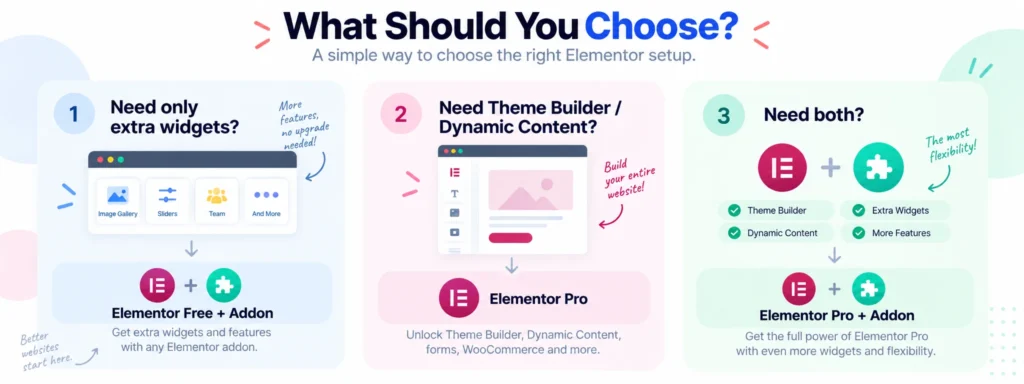
If Elementor Free already covers most of what you’re doing and you’re just missing a few widgets, get a good addon. If you want Elementor to control your site’s entire structure, Pro is usually the stronger pick. If you’re building something more advanced and still need specialized functionality on top, use both together.
No Elementor site is obligated to run Pro. And no Elementor site needs five different addon packs installed either. The best setup is almost always the smallest combination of tools that actually gets the job done — nothing more.
Final take
Elementor Pro and Elementor addons aren’t really competing products. Free gives you the foundation, Pro turns that foundation into a full site-building system, and addons extend that system further when you need something specific.
For a simple site, Free plus the right addon is often plenty. For a custom professional build, Pro can remove the need for several separate tools entirely. And for more advanced projects, Pro plus a well-chosen addon gives you both at once.
So skip the “which one has more features” question. Ask what your site actually needs first — the rest sorts itself out from there.
FAQ
Are Elementor addons the same as Elementor Pro? No. Pro is Elementor’s own official paid extension. Addons are typically third-party plugins that extend Elementor with extra widgets, integrations, or functionality.
Do I need Pro to use addons? Not usually. Most addons work fine with Elementor Free, though some individual widgets or integrations may require Pro — worth checking the addon’s requirements before buying.
Can addons replace Pro entirely? They can cover individual Pro features, but they don’t really replace Pro’s full, integrated site-building workflow.
Can I use Pro and addons together? Yes — this is actually a common and practical setup. Pro handles the core structure, addons fill in specialized widgets and functionality.
Are addons worth it? Yes, when they solve a real problem you have. Skip the ones that are just selling you a big widget count with nothing you’ll actually use.
Is Pro worth it for a simple site? Not necessarily. If your theme already handles the site structure and Elementor Free covers your design needs, you may not need it at all.