If your Elementor website feels limited, the problem usually comes from relying only on Elementor’s default features. While Elementor is a powerful WordPress page builder, its built-in widgets and customization options can become restrictive as your website grows.
Elementor addons solve this problem by adding advanced widgets, design elements, animations, marketing tools, WooCommerce features, and customization options that help create more professional and high-performing websites without coding.
Why Your Elementor Website Feels Limited — And How Addons Solve the Problem
Elementor has changed the way people build websites on WordPress. With its drag-and-drop editor, visual customization tools, and beginner-friendly interface, Elementor allows users to create beautiful websites without needing coding knowledge. It is fast, flexible, and highly popular among bloggers, agencies, freelancers, and business owners.
However, after using Elementor for some time, many users begin to notice certain limitations. Their websites may start looking similar to competitors, customization options may feel restricted, and advanced functionality may require extra effort. This is one of the biggest reasons why Elementor addons have become essential for modern WordPress websites.
What Makes Elementor Feel Limited?
Although Elementor offers a solid foundation, the default version is intentionally designed to stay lightweight and simple. That means many advanced design and marketing features are not included by default.
Here are the most common reasons Elementor websites feel limited.
1. Limited widgets and design elements
The free version of Elementor provides only basic widgets such as headings, images, buttons, and text blocks. Even Elementor Pro has limitations when compared to highly customized websites.
Users often need advanced features like:
- Interactive sliders
- Advanced tabs and accordions
- Content toggles
- Pricing tables
- Advanced testimonials
- Data tables
- Dynamic grids
- Creative galleries
- Before-and-after image effects
Without Elementor addons, these features either require coding or expensive custom development.
2. Websites start looking repetitive
One major issue with using default Elementor widgets is design repetition. Since thousands of websites use the same templates and layouts, many Elementor sites end up looking identical.
Modern users expect websites to feel unique, interactive, and visually engaging. If your design lacks originality, visitors may leave quickly, increasing bounce rates and lowering conversions.
Elementor addons introduce creative widgets, animations, hover effects, transitions, and advanced layout systems that help websites stand out.
3. Advanced functionality requires coding
Many website owners choose Elementor because they want a no-code solution. But eventually they discover that some advanced features still require CSS, JavaScript, or third-party integrations.
Examples include:
- Mega menus
- Sticky effects
- Dynamic content
- Advanced forms
- Custom post layouts
- Interactive timelines
- AJAX filtering
- Advanced WooCommerce customization
Elementor addons remove the need for complex coding by providing ready-made solutions.
4. Limited WooCommerce customization
If you run an online store, Elementor’s default WooCommerce capabilities may feel restrictive.
Store owners often need:
- Product comparison tools
- Advanced product galleries
- Wishlist functionality
- Sales countdown timers
- Quick view popups
- Product variation swatches
- Advanced checkout optimization
WooCommerce-focused Elementor addons make it easier to improve user experience and boost conversions.
5. Marketing features are missing
Modern websites require strong marketing functionality to generate leads and sales.
Many Elementor users struggle because the default builder lacks:
- Advanced popups
- Email marketing integrations
- Conversion-focused widgets
- Social proof notifications
- Countdown campaigns
- Interactive call-to-actions
- Advanced lead forms
Elementor addons solve this by integrating marketing-focused tools directly into the builder.
How Elementor Addons Solve the Problem
Elementor addons extend Elementor’s capabilities far beyond the default experience. They act as enhancement plugins that add powerful widgets, templates, animations, integrations, and customization features.
Here is how they solve Elementor’s biggest limitations.
1. Addons unlock advanced widgets
The biggest advantage of Elementor addons is access to hundreds of advanced widgets.
Popular addon features include:
- Advanced carousels
- Creative buttons
- Animated headlines
- Interactive cards
- Dynamic tables
- Timeline layouts
- Advanced pricing sections
- Image hotspots
- Interactive maps
These widgets help websites look more professional and modern.
2. Better website customization
Elementor addons provide deeper design control without requiring custom code.
Users can customize:
- Typography
- Hover animations
- Motion effects
- Scroll interactions
- Section transitions
- Responsive layouts
- Custom breakpoints
- Background effects
This creates a more engaging user experience across all devices.
3. Faster website development
Instead of building everything manually, Elementor addons offer pre-designed templates and blocks.
This saves time by allowing users to:
- Import ready-made sections
- Use complete website kits
- Customize templates quickly
- Build pages faster
Agencies and freelancers especially benefit from faster workflows.
4. Improved conversion optimization
Many Elementor addons focus heavily on increasing conversions.
Features often include:
- Advanced CTAs
- Lead generation forms
- Countdown timers
- Exit intent popups
- Interactive banners
- Sales funnels
- Testimonial sliders
- Social proof widgets
These tools help businesses generate more leads and sales directly from their websites.
5. Enhanced WooCommerce features
WooCommerce addons for Elementor improve online stores dramatically.
Benefits include:
- Better product displays
- Faster product filtering
- Improved mobile shopping
- Enhanced checkout experiences
- Product quick view functionality
- Wishlist integration
These improvements can directly increase ecommerce conversions.
Why Easy Elements Is the Smart Solution for Elementor Users
If you are searching for a powerful way to remove Elementor’s limitations, Easy Elements is one of the smartest solutions available. Instead of installing multiple Elementor addons that slow down your website, Easy Elements combines advanced widgets, creative design tools, WooCommerce enhancements, and marketing features into one optimized plugin.
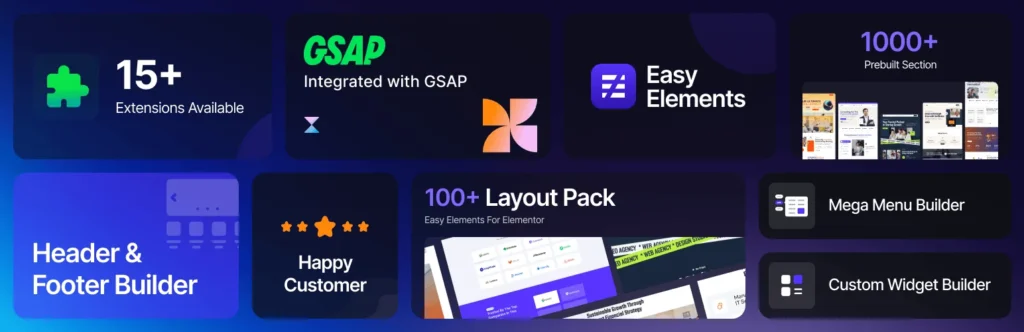
Easy Elements is designed to help Elementor users build faster, more professional, and highly customized websites without touching code. Whether you are a beginner, freelancer, agency, blogger, or ecommerce store owner, the plugin provides the flexibility needed to create modern websites that stand out from competitors.
Here’s why many Elementor users are switching to Easy Elements:
- Large collection of advanced Elementor widgets
- Lightweight and performance-focused design
- Fully responsive and mobile-friendly elements
- Creative animations and interactive effects
- WooCommerce optimization tools
- Advanced customization without coding
- Faster website building workflow
- SEO-friendly and clean code structure
- Regular updates and compatibility improvements
One of the biggest advantages of Easy Elements is simplicity. Instead of managing several third-party Elementor plugins that may conflict with each other, users can access everything from a single streamlined addon solution. This improves website stability, reduces plugin overload, and helps maintain better loading speed.
Easy Elements also helps solve one of the biggest problems Elementor users face — repetitive website design. With modern widgets, unique layouts, advanced styling controls, and dynamic content options, users can create websites that look more engaging and professional.
For WooCommerce websites, Easy Elements adds extra flexibility through advanced product layouts, interactive shopping features, conversion-focused widgets, and improved user experience tools that can help increase online sales.
If your Elementor website feels limited, Easy Elements provides the advanced functionality, creative freedom, and performance optimization needed to unlock Elementor’s full potential.
Final Thoughts
Elementor is an excellent website builder, but its default setup can eventually feel limiting for growing websites. As businesses and creators demand more advanced designs, marketing tools, and customization options, Elementor addons become essential.
The right Elementor addons help transform a simple website into a powerful, professional, and conversion-focused platform. Whether you want better design flexibility, advanced WooCommerce functionality, improved user engagement, or faster development workflows, addons solve the limitations that many Elementor users face.
Instead of struggling with restricted features or custom coding, Elementor addons unlock the full creative potential of your WordPress website.
Frequently Asked Questions (FAQs)
What are Elementor addons?
Elementor addons are plugins that extend Elementor’s functionality by adding advanced widgets, templates, animations, marketing tools, and WooCommerce features.
Are Elementor addons necessary?
Elementor addons are not mandatory, but they are highly useful for creating advanced, professional, and conversion-focused websites.
Do Elementor addons slow down websites?
Poorly optimized addons can slow down websites. Choosing lightweight and well-coded Elementor addons helps maintain good performance.
Can Elementor addons replace coding?
In many cases, yes. Elementor addons provide ready-made solutions for features that would otherwise require CSS, JavaScript, or PHP coding.
Are Elementor addons good for WooCommerce?
Yes. Many Elementor addons offer advanced WooCommerce features like product filters, quick view, wishlist functionality, and conversion optimization tools.
How many Elementor addons should I use?
Use only the addons you truly need. Installing too many can affect website speed and performance.