


BFCM Sale

  • Early Bird Sale
Grab the Deal
Easy Elements Elementor Addons Builder
Menu
  • Features
      Live Copy Paste
      Instantly copy any design from the demo site.
      Dynamic Content
      Display live data from your site instantly in any widget.
      Visibility Control
      Show or hide elements based on smart conditions.
      Custom CSS
      Style any widget easily with your own custom CSS.
      ScrollTrigger
      Animate beautifully as you scroll the page.
      Post/Page Duplicate
      Instantly clone any post or page with a single click.
      Wrapper Link
      Make any section or widget fully clickable with one link.
      Magic Cursor
      Add a stylish animated cursor for modern style.
      Sticky Elements
      Keep sections or widgets fixed while scrolling down.
      Cursor Hover Effect
      Trigger fun animations when hovering over items.
      Cursor Move Effect
      Create smooth motion effects following the cursor.
      Background Parallax
      Add stunning depth with smooth parallax scrolling.
      Easy Export
      Export widgets or templates quickly with simple step.
      Custom Code
      Insert HTML, CSS, or JS snippets safely and easily.
      Coming Soon
  • Widgets
  • Templates
    • Starter Templates
    • Page Templates
    • Sections
  • Pricing
  • Resources
      Get Support
      Documentation
      Blog
      Roadmap
      Affiliate Partner
      Contact Us
      Subscribe Now
  • My Account
Get Started

Enter your widget name

General Widgets

  • Progressbar
  • Instagram Feed
  • Bmi Calculator
  • Flip Box
  • Protected Contents
  • Advanced Search
  • Countdown
  • Counter
  • Info Box Slider
  • Advance Image
  • Simple Gallery
  • Rotate Text
  • Pricing Tab
  • Hover Image Box
  • Table
  • Horizontal Scroll
  • Advance Button
  • Custom Projects
  • Domain Search
  • Image Accordion
  • Slider
  • Breadcrumb
  • Social Icon
  • Social Share
  • Button
  • Marquee Logo
  • Process List
  • Service List
  • Pricing List
  • Pricing Table
  • Video
  • Contact Form 7
  • Post Slider
  • Post Grid
  • FAQ
  • Timeline Slider
  • Icon Box Slider
  • Contact Box
  • Team Slider
  • Team Grid
  • Gallery Filter
  • Process Slider
  • Process Grid
  • Info Box
  • Image Carousel
  • Testimonials Slider
  • Testimonials Grid
  • Advanced Tab
  • Tab
  • Clients Logo Slider
  • Clients Logo Grid
  • Heading

Header & Footer Widget

  • Page Title
  • Navigation Menu
  • Search
  • Site Logo
  • Offcanvas

Theme Builder Widget

  • Scroll To Top
  • Featured Image
  • Post Meta
  • Post Title
  • Post Excerpt
  • Current Post Tags
  • Current Post Author
  • Post Comments
  • Post Pagination
  • Related Post

Animations

  • Text Animation
  • Animated Heading
  • Animated Title
  • Typewriter

Extensions

  • Easy Export
  • Cursor Move Effect
  • Cursor Hover Effect
  • Background Parallax
  • Sticky Elements
  • Wrapper Link
  • Visibility Control
  • Dynamic Content
  • Live Copy
  • Magic Cursor
  • Post/Page Duplicate
  • Custom CSS
  • Custom Code

Image Widgets

  • Reveal Image

Forms

  • Login Register
View Categories
  • Home
  • Docs
  • General Widgets
  • Protected Contents

Protected Contents

The Protected Content widget allows you to hide specific sections of your page and make them accessible only to selected users. You can restrict content by password, user role, or login status, ensuring only the right audience can view your protected information.

How to Use Protected Content Widget of Easy Elements Pro

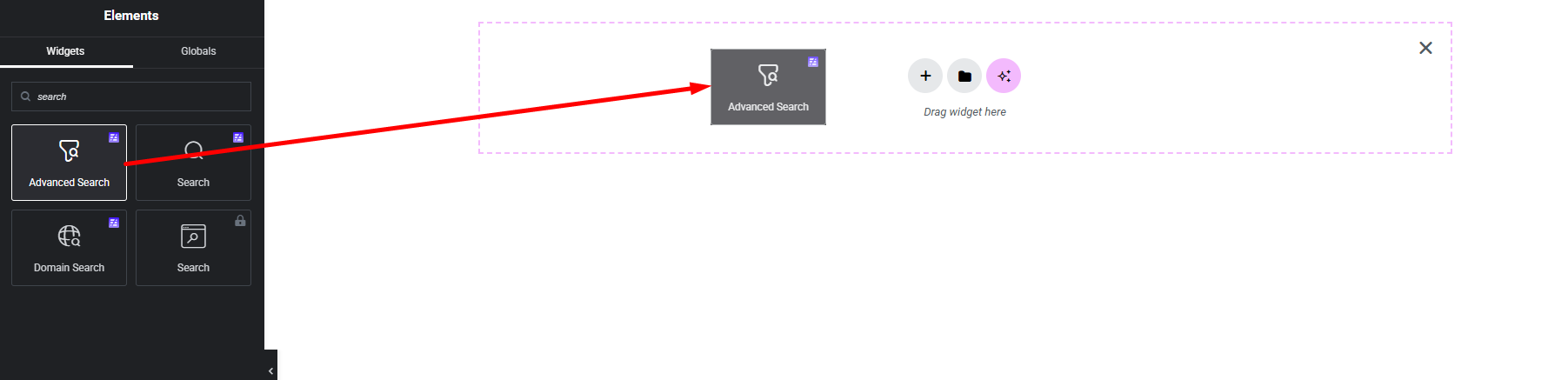
Step 1:

Add Protected Content Widget:

Select the Protected Content widget from the left panel, then drag and drop it into your desired area on the canvas.
Step 2:

Protected Content Settings:

  1. Content Type
  2. Protection Type
  3. Warning Message
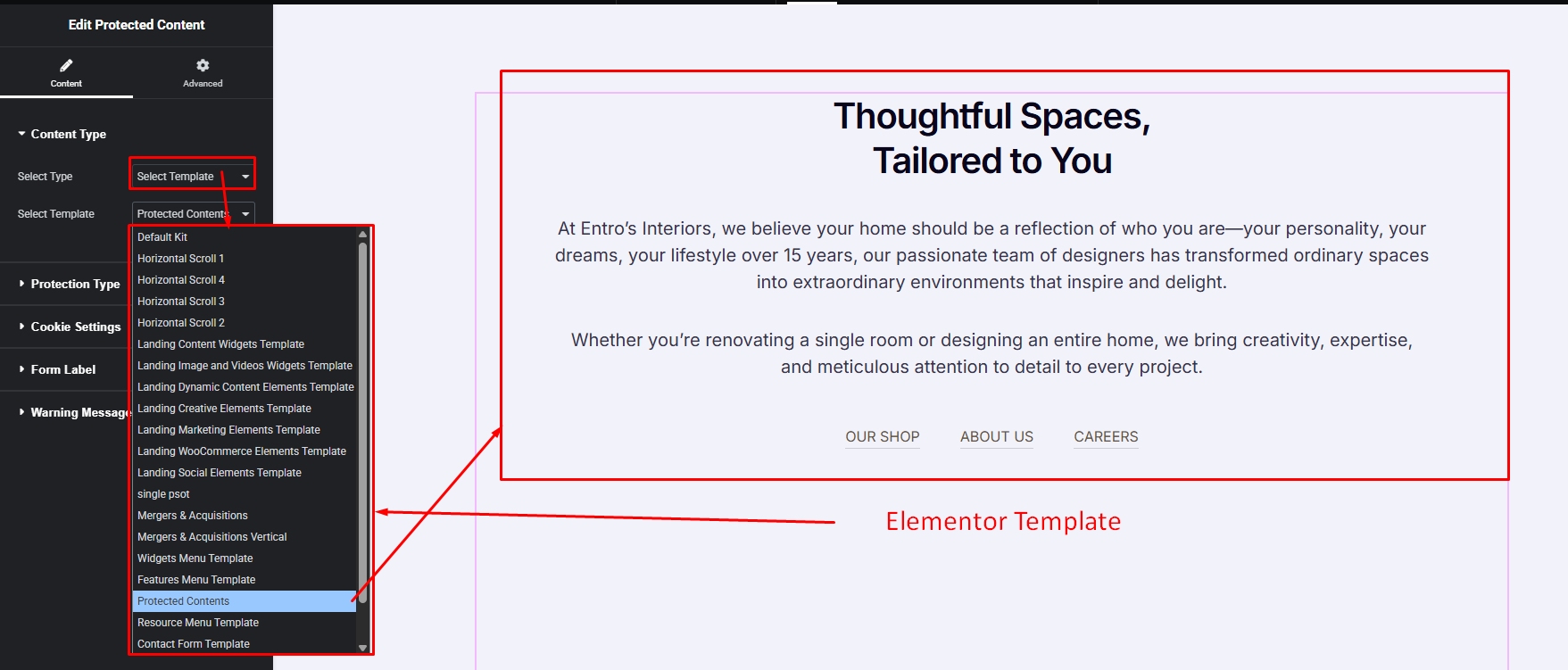
Content Type:
  1. Normal Content
  2. Template Content

Normal Content:

Display simple protected content using the Text Editor. Perfect when you want to show basic text without using templates.
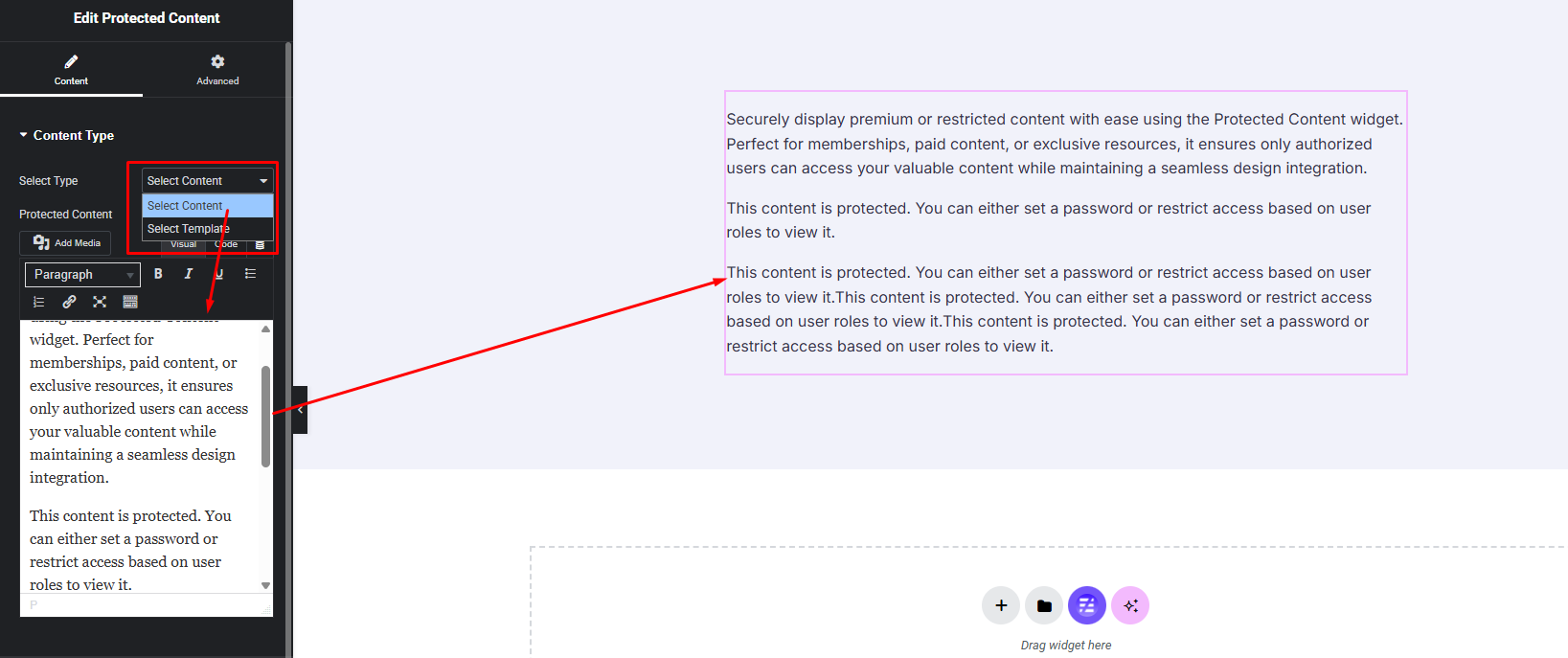
Template Content:

Select an Elementor template to show as your protected content. This allows you to design the restricted section separately and reuse it anywhere
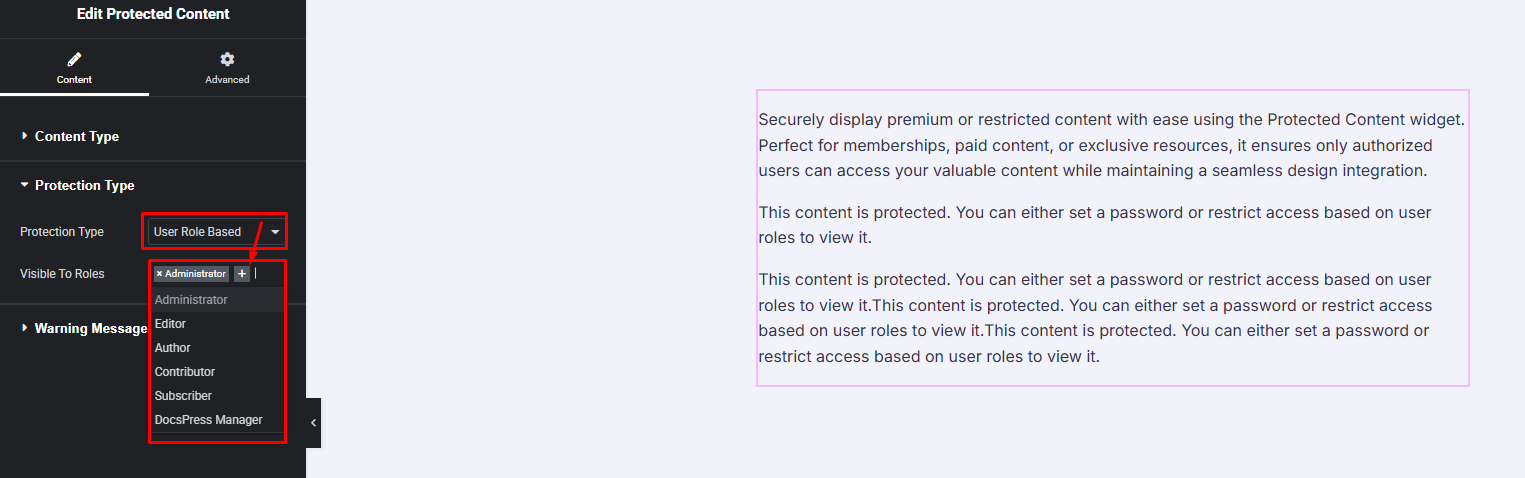
Protection Type:
  1. User Role Based
  2. Password Protected

User Role Based:

Restrict content visibility based on specific user roles. Only users with the selected roles will be able to access the protected content. (ex role: Administrator, Author, Editor etc.)
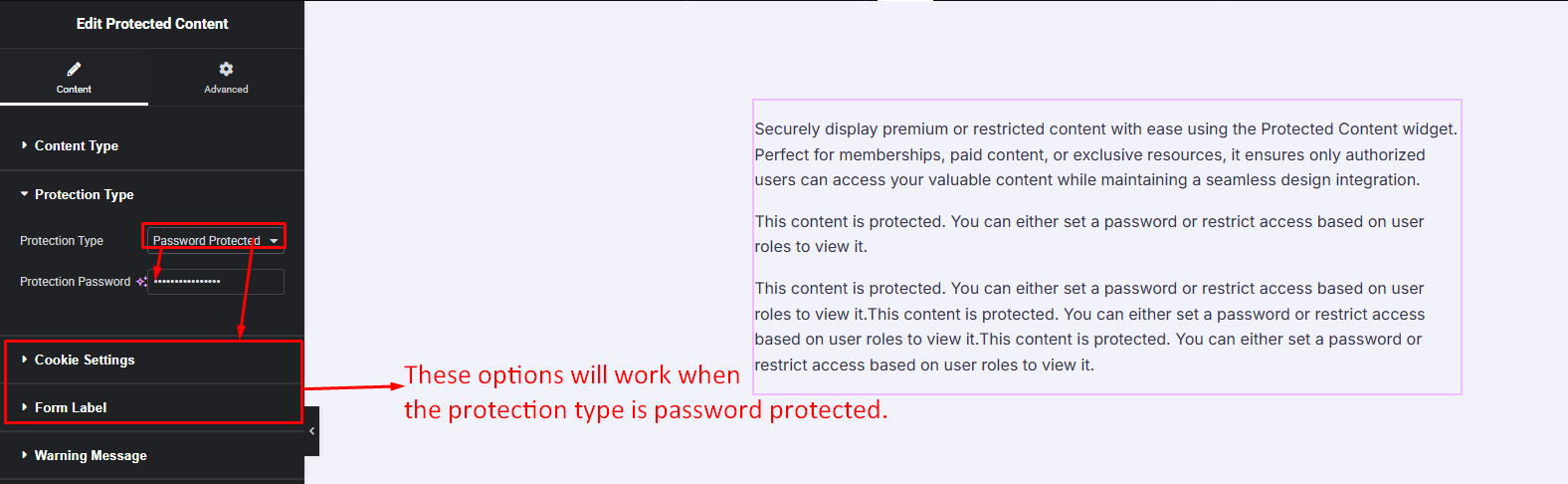
Password Protected:

Protect your content with a password. Only users who enter the correct password can view the restricted content.
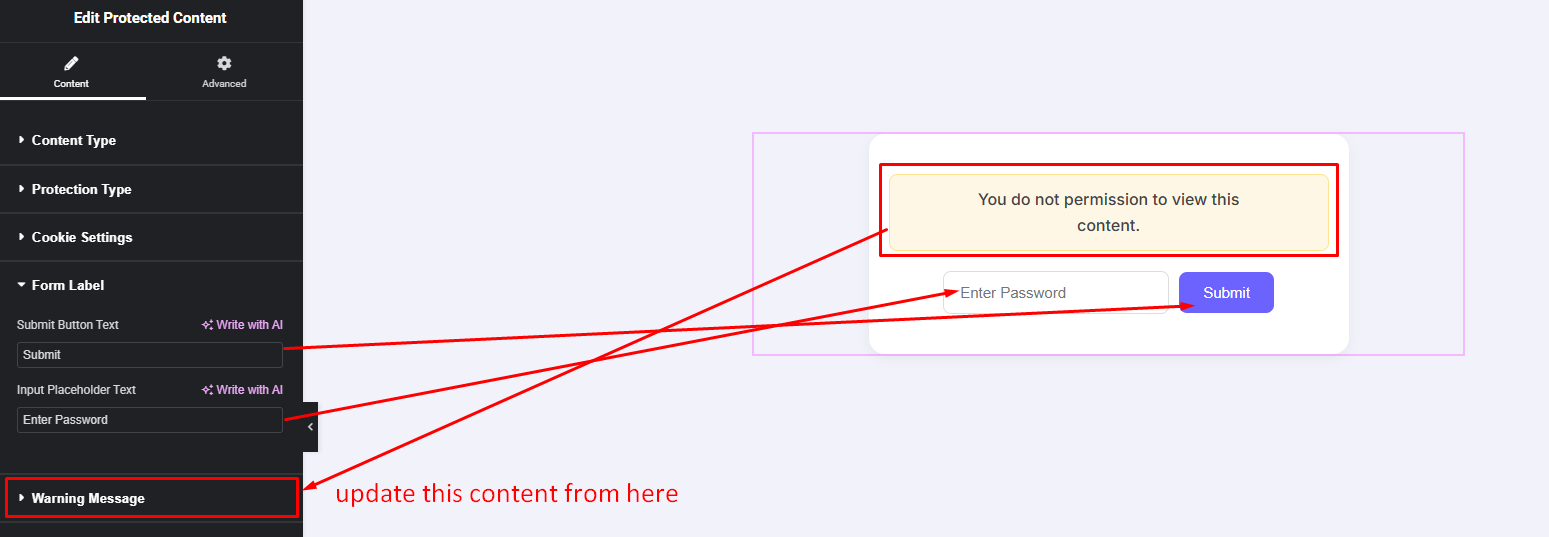
Warning Message:
  1. Unauthorized Message
  2. Wrong Password Message
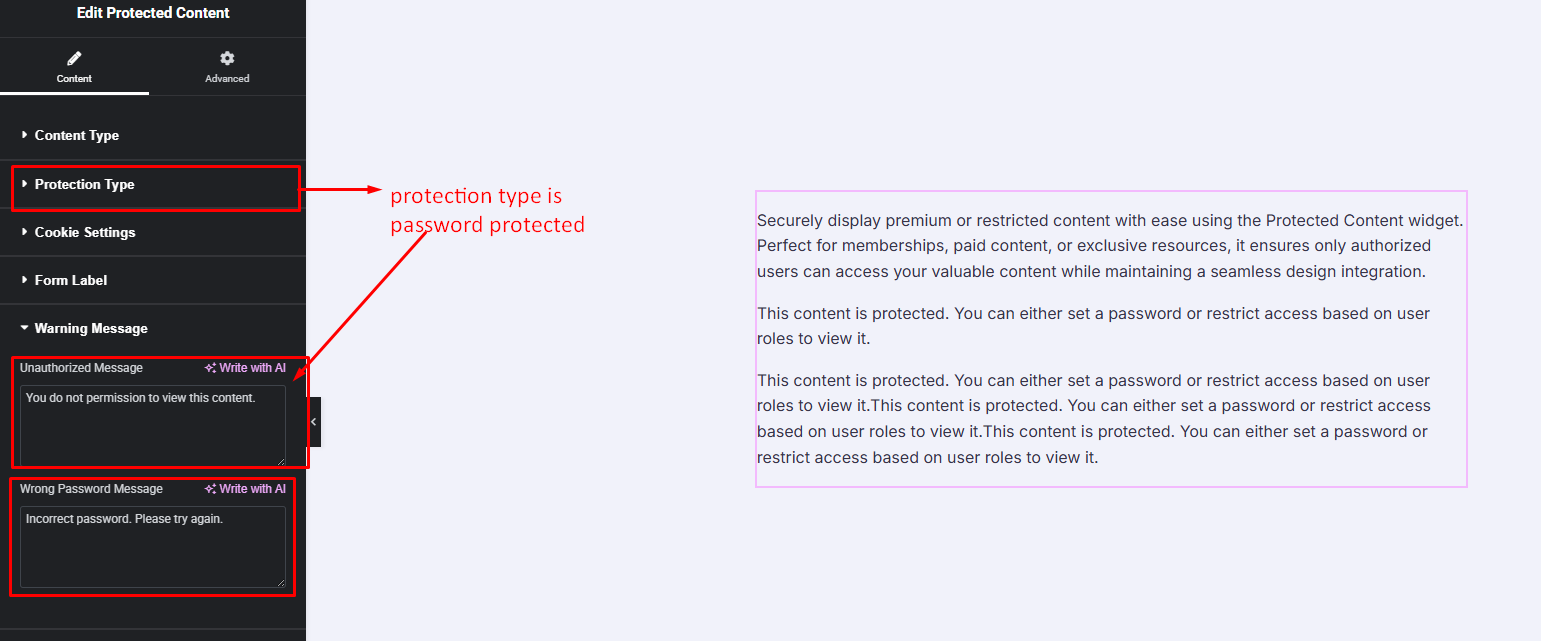
Protection Type: Password Protected
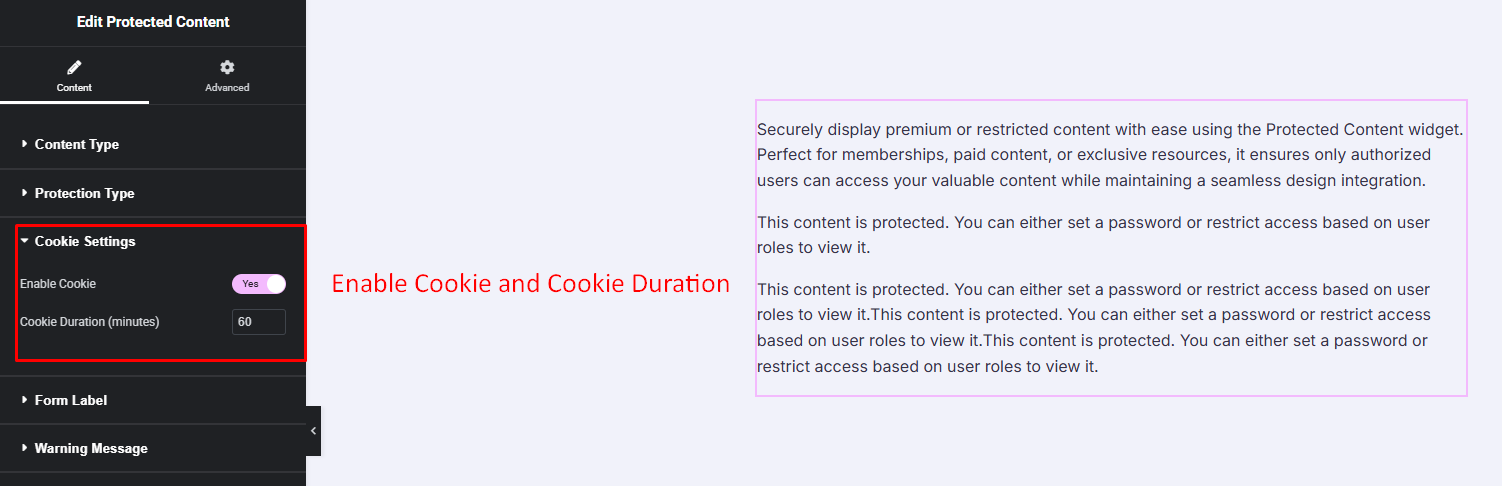
  1. Cookie Settings
  2. Form Label

Cookie Settings:

Form Label:
What are your Feelings

Share This Article :

  • Facebook
  • X
  • LinkedIn
  • Pinterest
Still stuck? How can we help?

Still stuck? How can we help?

Updated on November 18, 2025
Flip BoxAdvanced Search

Download Now & Design Without Limits!

Bring your Elementor designs to life with Easy Elements — create stunning, animated websites effortlessly. No code. No limits. Just motion made easy.
Start Free Trial
Get Pro
Easy Elements Elementor Addons Builder
Our core value is regularity, responsiveness, and innovation. This is why people love us With the qualified dedicated support.
Follow our Socials
Useful Link
Menu
  • Demo
  • Privacy Policy
  • Refund Policy
  • Terms of Condition
  • Changelog
Supports
Menu
  • Documentation
  • Contact Us
  • Submit Request
  • Affiliates
  • Support
News Letter
Subscribe to our newsletter
Subscription Form
Payment Getaway

© All Rights Reserved - Easy Elements by ThemeWant.

  • Support
  • Privacy Policy
  • Features
      Live Copy Paste
      Instantly copy any design from the demo site.
      Dynamic Content
      Display live data from your site instantly in any widget.
      Visibility Control
      Show or hide elements based on smart conditions.
      Custom CSS
      Style any widget easily with your own custom CSS.
      ScrollTrigger
      Animate beautifully as you scroll the page.
      Post/Page Duplicate
      Instantly clone any post or page with a single click.
      Wrapper Link
      Make any section or widget fully clickable with one link.
      Magic Cursor
      Add a stylish animated cursor for modern style.
      Sticky Elements
      Keep sections or widgets fixed while scrolling down.
      Cursor Hover Effect
      Trigger fun animations when hovering over items.
      Cursor Move Effect
      Create smooth motion effects following the cursor.
      Background Parallax
      Add stunning depth with smooth parallax scrolling.
      Easy Export
      Export widgets or templates quickly with simple step.
      Custom Code
      Insert HTML, CSS, or JS snippets safely and easily.
      Coming Soon
  • Widgets
  • Templates
    • Starter Templates
    • Page Templates
    • Sections
  • Pricing
  • Resources
      Get Support
      Documentation
      Blog
      Roadmap
      Affiliate Partner
      Contact Us
      Subscribe Now
  • My Account